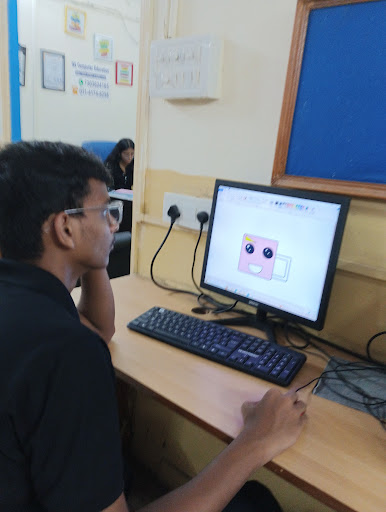
Computer Institute in South Ex
Are you looking for a computer institute in South Ex to improve your computer skills and prepare for future career opportunities? Learning computer applications is useful for students, job seekers, working professionals and beginners who want to become more confident with technology.
From basic computer operations and MS Office to Advanced Excel, Python programming, web designing and digital marketing, computer training can help you develop practical skills for academic and professional tasks.
If you are searching for computer education in South Extension, New Delhi, choosing a course that matches your interests and career goals is an important first step.
Why Choose Computer Classes in South Ex?
Computers are widely used in education, business, administration and communication. Developing computer proficiency can help you prepare documents, manage information, communicate online and complete everyday office tasks.
Joining computer classes in South Ex can provide a structured learning environment where you can understand essential concepts and practise using different applications.
Some benefits of computer training include:
- Practical computer skills: Learn to use common applications and digital tools.
- Career preparation: Develop skills relevant to administrative and entry-level technical roles.
- Academic support: Prepare assignments, presentations and digital projects.
- Improved productivity: Learn to manage documents, spreadsheets and information efficiently.
- Further learning: Build a foundation for programming, data analytics and other specialised courses.
Look for classes that provide sufficient practical sessions, a clear syllabus and guidance from instructors.
Computer Course in South Ex for Different Learning Goals
The right computer course in South Ex depends on your current knowledge and what you want to achieve.
1. Basic Computer Course
A basic computer course introduces beginners to computer hardware, software, operating systems, file management, internet usage and email.
It is suitable for learners who want to develop essential computer skills before moving to advanced applications.
2. MS Office Course
MS Office training can help you learn Microsoft Word, Excel and PowerPoint.
These applications are useful for preparing documents, managing spreadsheets, creating presentations and completing routine office tasks.
3. Advanced Excel Course
Advanced Excel training focuses on formulas, lookup functions, PivotTables, charts, data management and reporting.
These skills can be useful for administrative work, record management and spreadsheet-based analysis.
4. Python Programming Course
Python training introduces programming fundamentals, including variables, loops, functions and data structures.
After learning the basics, students can explore projects involving automation, data processing and application development.
5. Web Designing Course
Web designing training may cover HTML, CSS and other technologies used to create websites.
It can be a suitable option for learners interested in website layouts, front-end development and digital projects.
6. Data Analytics Course
Data analytics training may include Excel, SQL, Python, data cleaning, visualisation and reporting.
It helps learners understand how information can be organised and analysed to identify patterns and communicate findings.
7. Data Entry and Typing Course
Data entry training can help learners improve typing accuracy, spreadsheet handling, record management and basic office operations.
Students can also explore English and Hindi typing according to their requirements.
Before enrolling, check the course syllabus, duration, fees and practical training facilities.
Computer Coaching South Ex for Students and Job Seekers
If you are searching for computer coaching South Ex, consider a programme that combines explanations with hands-on practice.
Students may need computer skills for academic assignments, while job seekers may want to improve their proficiency in Word, Excel, email and other office applications.
Working professionals may benefit from advanced spreadsheet skills, programming or data analytics, depending on their responsibilities.
When comparing courses, consider:
- Your existing computer knowledge
- The skills you want to develop
- The syllabus and practical exercises
- Class timings and course duration
- Trainer support and learning facilities
- Total fees and certificate details
Choosing a course based on your goals can help you use your time effectively.
Computer Training Institute South Ex: What Should You Check?
Selecting the right computer training institute South Ex requires more than comparing course fees.
Practical Learning Facilities
Check whether students have access to computers and sufficient time to complete exercises independently.
Course Syllabus
Ask for a detailed syllabus that clearly explains the topics and applications included in your chosen programme.
Trainer Support
Look for instructors who can explain difficult concepts and provide guidance when you encounter problems.
Flexible Batch Timings
Choose classes that fit your school, college or work schedule.
Transparent Fees
Confirm the complete fee structure, including registration, examination and certificate charges where applicable.
Certificate Information
Ask which organisation issues the certificate and whether an assessment is required.
If you are considering a formally recognised qualification, verify the relevant recognition or authorisation directly with the appropriate organisation.
Computer Education South Ex for Beginners
Quality computer education South Ex should help learners build confidence step by step.
Beginners can start with computer fundamentals and gradually progress to office applications or specialised technical subjects.
A practical learning path may include:
- Learning computer basics and file management.
- Developing typing and document formatting skills.
- Practising MS Word and Excel.
- Learning internet and email operations.
- Exploring advanced Excel, programming or web designing.
- Building small projects to apply the concepts learned.
This approach allows learners to develop a strong foundation before taking on more complex topics.
Computer Classes South Extension: How to Find a Suitable Course
When searching for computer classes South Extension, compare available programmes based on their relevance to your goals.
If you are a beginner, a basic computer course may be a suitable starting point. If you already understand computer fundamentals, you might prefer Advanced Excel, Python, data analytics or web development.
Before choosing a course, ask about practical sessions, course materials, batch timings and opportunities to practise independently.
You can also ask whether the institute offers a trial class or a counselling session to help you understand the teaching approach.
Consider the location and travel time as well, particularly if you plan to attend classes regularly.
Computer Institute South Extension: Which Course Is Right for You?
A computer institute South Extension search may lead you to programmes covering different levels of computer education.
Use your goals to narrow down your options.
For school and college students: Basic computer skills, MS Office and programming fundamentals can provide a useful starting point.
For job seekers: MS Office, Advanced Excel, typing and data entry can help develop office-related skills.
For aspiring developers: Python programming and web designing can introduce you to software and website development.
For data-focused careers: Excel, SQL and Python can provide a foundation for learning data analysis.
For working professionals: Advanced Excel and productivity applications may help improve efficiency in everyday tasks.
No single course is suitable for everyone. Review the syllabus and choose a programme that matches your current abilities and intended learning outcomes.
Career Benefits of Learning Computer Skills
Computer training can help you develop skills that are relevant to a variety of academic and workplace activities.
Depending on your training and qualifications, you may explore roles involving office administration, data entry, spreadsheet reporting, computer operations, website development or programming.
Some technical positions require additional education, practical experience or specialised knowledge. A short course can be a useful starting point, but it does not guarantee employment.
To improve your learning outcomes, practise regularly and work on small projects that demonstrate your abilities.
Frequently Asked Questions
1. Which computer course is suitable for beginners?
A basic computer course is often a good starting point. It introduces computer operations, file management, internet usage and essential applications.
2. What courses can I study at a computer institute in South Ex?
Depending on the institute, options may include basic computer training, MS Office, Advanced Excel, Python, web designing, data entry, typing and data analytics.
3. Is computer training useful for job seekers?
Yes. Computer training can help develop skills relevant to office administration, data entry, reporting and some technical roles. Employment requirements vary by employer.
4. How do I choose computer classes in South Extension?
Compare the course syllabus, practical facilities, trainer support, fees, batch timings, location and certificate details before enrolling.
5. Can beginners learn Python or web designing?
Yes. Beginners can start with foundational concepts and progress gradually. Regular practice and project work are important for developing programming and web design skills.
6. Should I choose a basic or advanced computer course?
Choose a basic course if you are new to computers. If you already have foundational skills, an advanced course such as Excel, Python or data analytics may better match your goals.
Start Your Computer Learning Journey
Developing computer skills can help you improve your digital confidence and prepare for further learning.
Whether you want to learn basic computer operations, improve your MS Office skills or explore programming, compare available courses and choose one that suits your interests.
Ready to learn? Contact your preferred computer training institute in South Ex or South Extension to enquire about course details, fees, practical training and available batches.
Take the first step towards building useful computer skills for education and professional development.
Frequently Asked Questions
Looking for a computer institute in South Ex? Find answers about computer courses, practical training, beginner classes and choosing the right programme for your goals.
01 Which computer courses are available in South Ex? +
Depending on the institute, available courses may include Basic Computer, MS Office, Advanced Excel, Python, Web Designing, Web Development and Data Analytics. Check the syllabus and available batches before enrolling.
02 Can beginners join computer classes in South Ex? +
Yes. Beginners can start with computer fundamentals, keyboard and mouse operations, file management, internet usage and basic MS Office applications. Regular practice can help you build confidence step by step.
03 How do I choose the right computer course in South Ex? +
Choose a course according to your current skills and goals. Basic Computer and MS Office are useful starting points, Advanced Excel supports spreadsheet and reporting skills, and Python or Web Development can introduce you to programming. Compare the syllabus, fees, timings and practical facilities.
04 What should I check before joining a computer training institute South Ex? +
Check the course syllabus, trainer support, computer lab, practical assignments, batch timings, total fees and certificate details. Ask whether you will have enough time to practise the software covered in the course.
05 Are computer classes in South Extension suitable for students? +
Yes. Students can learn computer fundamentals, MS Office, Excel, programming and other digital skills depending on their interests. The right course can help with academic projects and prepare them for further technical learning.
06 What is the difference between computer coaching and practical training? +
Computer coaching generally includes explanations and guided learning, while practical training focuses on applying those concepts through exercises and projects. A balanced programme should combine both approaches.
07 Can I learn Advanced Excel or Python after a basic computer course? +
Yes. After developing basic computer skills, you can progress to Advanced Excel or begin learning Python. Excel is useful for spreadsheets and reporting, while Python introduces programming and can support further learning in automation and data analytics.
08 How can I enquire about computer education in South Ex? +
Call or WhatsApp us on 7303624165 to discuss your learning goals. You can ask about course options, syllabus, fees, duration and available batch timings before deciding which programme suits you.
Not Sure Which Computer Course to Choose?
No worries! Tell us what you want to learn, whether it is basic computer skills, MS Office, Advanced Excel, Python or web development. We will help you explore suitable course options and understand the syllabus, fees and available batch timings.