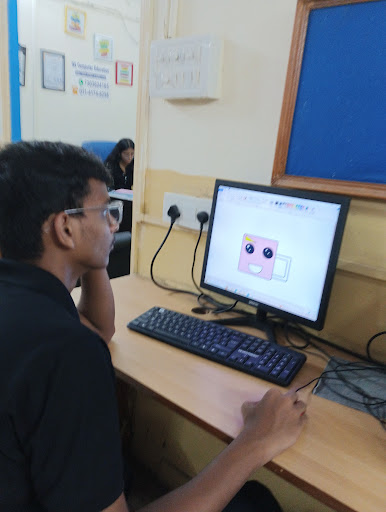
Basic Computer Course in South Ex
Are you looking for a basic computer course in South Ex to improve your computer skills for education, office work or career development? Learning basic computer operations is an important step towards becoming confident with digital technology.
Whether you are a school student, college student, job seeker, homemaker or working professional, computer knowledge can help you perform everyday tasks more efficiently. From creating documents and using spreadsheets to sending emails and managing files, these skills are useful in many areas of life.
A structured computer training programme can help you learn at your own pace through guided lessons and practical exercises. If you are planning to start learning, explore the available computer courses in South Extension and choose one that matches your needs.
Why Join Basic Computer Classes in South Ex?
Computers are widely used in schools, colleges, offices and businesses. Basic computer knowledge can help you prepare assignments, maintain records, communicate online and complete everyday digital tasks.
Joining basic computer classes in South Ex can help you develop these skills in a structured learning environment.
Here are some benefits of basic computer training:
- Beginner-friendly learning: Start with essential computer operations without needing advanced technical knowledge.
- Practical experience: Learn by using computer applications and completing exercises.
- Office productivity: Understand document creation, spreadsheets and presentations.
- Digital confidence: Learn to use the internet, email and common online services.
- Career preparation: Develop computer skills relevant to many entry-level positions.
- Further learning: Build a foundation for Advanced Excel, programming, web designing and other specialised courses.
Regular practice is important because it helps you become more comfortable using computer applications independently.
What Will You Learn in a Computer Fundamentals Course in South Ex?
A computer fundamentals course in South Ex introduces the essential concepts needed to operate a computer and understand its basic functions.
1. Introduction to Computers
Learn what a computer is, how it works and how it is used in everyday life.
Understand the functions of common components such as the keyboard, mouse, monitor, CPU, printer and storage devices. You can also learn the difference between hardware and software.
2. Operating System and File Management
Learn how to navigate the computer desktop, open applications and organise digital files.
Important topics may include:
- Creating and organising folders
- Copying, moving and renaming files
- Saving and locating documents
- Managing downloaded files
- Understanding file types and extensions
- Using common operating system features
These skills are useful for students and employees who regularly work with digital documents.
3. MS Word
Microsoft Word is commonly used to prepare documents for educational and professional purposes.
During your training, you may learn how to create letters, applications, resumes and reports. Other topics can include text formatting, tables, page layouts, margins, headers and footers, saving and printing documents.
4. MS Excel
Microsoft Excel helps users organise information, perform calculations and prepare reports.
A beginner-level course may cover entering data, formatting cells, using basic formulas, creating tables, sorting records and preparing simple spreadsheets.
These skills are useful for attendance sheets, expense records, lists and everyday office tasks.
5. MS PowerPoint
Learn how to create presentations for classroom assignments, meetings and professional communication.
Topics may include slide layouts, inserting text and pictures, formatting content, applying themes and presenting slides effectively.
6. Internet and Email
Understand how to browse websites, search for information and use email for communication.
Learn to send messages, attach documents, download files and follow basic online safety practices.
7. Typing and Printing
Develop keyboard familiarity and improve typing accuracy through regular practice. You can also learn how to print documents and understand basic printer settings.
The exact modules depend on the institute’s syllabus, so confirm the included topics before enrolling.
Computer Course for Beginners in South Ex
A computer course for beginners in South Ex is suitable for people who want to learn computer skills from scratch.
You do not necessarily need previous technical knowledge to start a beginner-level programme. A well-structured course introduces each concept gradually and provides time for practice.
This type of training can be useful for:
School students: Learn computer operations and prepare digital assignments.
College students: Develop skills for presentations, projects and future employment.
Job seekers: Practise document preparation, spreadsheets, email and file management.
Homemakers: Become more confident using computers for online services and personal tasks.
Working professionals: Improve familiarity with common office applications.
Adult learners: Learn essential digital skills at a comfortable pace.
Before joining, ask whether the course includes individual practice time, trainer support and beginner-friendly lessons.
MS Office Course in South Ex for Students and Professionals
An MS Office course in South Ex can help you learn the applications commonly used for office productivity.
The main applications generally include Microsoft Word, Excel and PowerPoint. Some programmes may also introduce additional productivity tools.
MS Word for Document Preparation
Learn to prepare professional documents, letters, applications, reports and resumes with suitable formatting.
MS Excel for Spreadsheets
Understand how to organise data, use basic formulas, format tables and prepare simple reports.
MS PowerPoint for Presentations
Learn to create clear and organised presentations for academic projects and workplace meetings.
Learning these applications can help you perform common computer-based tasks more confidently. If your goal is to work in an office, ask whether the course includes practical assignments based on everyday workplace activities.
Computer Certificate Course in South Ex
If you want to document your learning, consider a computer certificate course in South Ex.
A certificate programme may include structured lessons, practical exercises and an assessment at the end of the course. The certificate and assessment process depend on the institute and the programme offered.
Before enrolling, check the following details:
- Course syllabus and duration
- Practical training facilities
- Assessment or examination requirements
- Certificate-issuing organisation
- Total course fees and additional charges
- Whether the certificate meets your intended academic or employment requirements
A course completion certificate is not automatically equivalent to a government-recognised qualification or a certification issued by a particular software company. Verify the issuing organisation and recognition details before admission.
How to Choose the Right Computer Training Institute in South Ex
Choosing the right training provider can make your learning experience more effective. Do not compare institutes only on the basis of fees; also consider the quality of training and the opportunity to practise.
Check the Syllabus
Make sure the course includes the topics you want to learn, such as computer fundamentals, MS Office, internet usage and file management.
Ask About Practical Classes
Regular hands-on practice can help you understand software applications and become more independent.
Check Trainer Support
Ask whether instructors provide guidance when students face difficulties or need additional practice.
Compare Batch Timings
Choose a schedule that fits your school, college, work or personal commitments.
Understand the Total Fees
Confirm the course fee and ask about registration, examination or certificate charges, if applicable.
Review Certificate Details
Check which organisation issues the certificate and whether any assessment is required.
Taking time to compare these factors can help you select a course that matches your learning goals.
What Can You Learn After a Basic Computer Course?
Once you understand computer fundamentals, you can explore additional courses based on your interests.
- Advanced Excel: Develop spreadsheet, formula, reporting and dashboard skills.
- Data Entry: Improve typing, data handling and record management.
- Python Programming: Learn programming fundamentals and problem-solving.
- Web Designing: Explore website structure, HTML and CSS.
- Data Analytics: Progress towards Excel, SQL, Python and data visualisation.
- Digital Marketing: Learn about SEO, online advertising and digital communication.
Starting with basic computer training can make it easier to understand these specialised subjects. Choose your next course according to your educational background and career goals.
Frequently Asked Questions
Find answers to common questions about beginner computer training, MS Office, course certificates and choosing a suitable training programme in South Ex.
Start Learning Computer Skills in South Ex
Learning computer skills can help you become more confident with technology and prepare for further education or professional development.
Whether you want to start from scratch, improve your MS Office knowledge or prepare for more advanced computer training, choose a programme that offers clear explanations and regular practical exercises.
Compare the syllabus, course duration, fees and available batch timings before enrolling.
Ready to get started? Contact your preferred computer training institute to ask about available courses, practical sessions, fees and certificate options.
Take the first step towards building useful computer skills for today’s digital world.
Frequently Asked Questions
Planning to learn computer skills in South Ex? Find answers about beginner computer courses, MS Office, practical training and certificates before choosing your course.
01 What is taught in a basic computer course in South Ex? +
A basic computer course may cover computer fundamentals, operating systems, file management, MS Word, basic Excel, PowerPoint, internet usage, email and typing. The exact syllabus depends on the training institute.
02 Can beginners join basic computer classes in South Ex? +
Yes. Beginner-friendly classes introduce computer operations step by step. You can learn to use the keyboard and mouse, manage files, create documents and use common applications through guided practice.
03 What is included in a computer fundamentals course in South Ex? +
Computer fundamentals generally include hardware, software, input and output devices, operating systems, storage, file management and basic internet concepts. Practical exercises help you apply what you learn.
04 Which computer course is suitable for beginners? +
A basic computer course is a suitable starting point if you have little or no previous experience. Once you understand the fundamentals, you can progress to MS Office, Advanced Excel, Python or other specialised courses.
05 What will I learn in an MS Office course in South Ex? +
An MS Office course commonly covers Word for documents, Excel for spreadsheets and calculations, and PowerPoint for presentations. Some programmes may include additional productivity tools depending on the syllabus.
06 Will I receive a certificate after completing the course? +
Certificate availability depends on the programme and institute. Before enrolling, confirm the certificate-issuing organisation, assessment requirements and whether the certificate meets your intended purpose.
07 How do I choose a computer certificate course in South Ex? +
Compare the syllabus, practical classes, course duration, trainer support, total fees and certificate details. Choose a programme that matches your current skills and future learning or employment goals.
08 How can I enquire about basic computer classes in South Ex? +
Call or WhatsApp us on 7303624165 to ask about course options, syllabus, fees, duration and available batch timings. Share your learning goals, and we will help you explore suitable options.
Ready to Learn Computer Skills?
Not sure which course to choose? No worries! Contact us to discuss your learning goals and ask about Basic Computer, MS Office, practical training, course fees and available batch timings. We will be happy to guide you.